What Cyber Insurance Actually Requires Now (And Why Claims Get Denied)
Somewhere in a filing cabinet or a shared drive, your business has a cyber insurance application. Someone filled it out — maybe your office manager, maybe your accountant, maybe you, at 11pm, the night before the renewal deadline. It asked whether you enforce multi-factor authentication. Whoever filled it out checked yes, because MFA is on, or at least it's on for most people, or IT said it was on.
That checkbox is now part of your insurance contract.
Here's the part most business owners don't know: if the answer turns out to have been wrong, the carrier may not simply deny the claim. It may void the policy from inception — treat it as though it never existed, deny the current claim, and in some cases claw back anything already paid under that policy term.
This guide covers what carriers actually require in 2026, how to verify your own answers before you sign anything, and what to do if you've already signed an application you're no longer sure about.
Why the application changed
Cyber insurance used to be easy to buy. Carriers priced it like any other commercial line, asked a handful of yes-or-no questions, and wrote the policy.
Then the ransomware claims of 2020 and 2021 arrived, followed by a wave of business email compromise losses. Carriers lost money — a lot of it — on policies underwritten from thin questionnaires. The market response was predictable: deeper technical questions, follow-up interviews, external vulnerability scans run on your public-facing infrastructure during underwriting, and far less patience for "we think we have antivirus."
Specific incidents drove specific questions. Supply-chain breaches produced vendor-risk sections. Ransomware incidents in healthcare produced backup-immutability questions. Deepfake-enabled wire fraud produced payment-verification questions. If a section of your application feels oddly specific, it's usually because it was written in response to a loss the carrier actually paid.
The practical result: the application is no longer paperwork. It's a technical audit that you self-administer, and then sign.
The controls carriers ask about
Requirements vary by carrier, and your broker's current application is always the authoritative list for your renewal. But the market has converged on a consistent core. Below is what carriers ask, what a truthful "yes" actually requires, and how to check it in a typical Microsoft 365 environment.
1. Multi-factor authentication
What they ask: Is MFA enforced for all users accessing email? For remote network access? For privileged and administrative accounts?
Note the structure. It is almost never a single question. Carriers ask about MFA in layers because they know that "we have MFA" and "MFA is enforced everywhere it matters" are different statements.
What a truthful yes requires: Every user account, including service accounts, shared mailboxes with sign-in enabled, contractors, and the global admin account nobody uses but never disabled. The most common gap we see is a break-glass admin account created during setup and exempted from Conditional Access "temporarily," three years ago.
How to verify: Don't ask whether MFA is "on." Ask for a report listing every account and its actual MFA registration and enforcement status. In Microsoft 365, that's the authentication methods report in Microsoft Entra ID, cross-referenced against your Conditional Access policies — a policy that exists but is set to report-only mode is not enforcement. Check the exclusion list on every Conditional Access policy. That's where the surprises live.
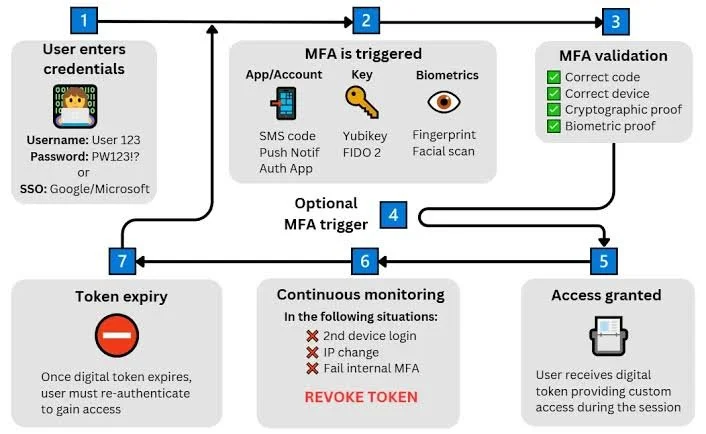
Continuous MFA enforcement vs. basic authentication sign-in. Source: Business Broadband Hub
2. Endpoint detection and response
What they ask: Do you have EDR deployed across your endpoints? Which product? What percentage coverage?
What a truthful yes requires: Traditional signature-based antivirus generally no longer satisfies underwriting. Carriers want behavioral detection with response capability. Coverage needs to be close to complete — the one unmanaged laptop is the one that gets encrypted.
How to verify: Pull an inventory from your EDR console and reconcile it against your actual device list from your identity provider or asset inventory. Personal devices used for work, the machine in the conference room, and the laptop belonging to the person who left in March all count.
3. Backups that survive an attacker with admin credentials
What they ask: Are backups offline, air-gapped, or immutable? When did you last test a restore?
What a truthful yes requires: This is the control most often overstated, because most people answer based on whether backups run, not whether they'd survive. If your backup target is reachable with domain admin credentials, ransomware reaches it too. Immutable means the data cannot be modified or deleted for a defined retention window, even by someone holding stolen administrator credentials.
The old 3-2-1 rule has effectively become 3-2-1-1-0 in underwriting practice: three copies, two media types, one offsite, one immutable, zero unverified restores.
How to verify: Find the date of your last successful test restore. Not a backup job success notification — an actual restore of actual data to a usable state. If you can't produce a date, the honest answer to "have you tested your backups" is no.
A related trap: many businesses answer yes on backups while running Microsoft 365 with no third-party backup at all. Microsoft's retention windows are not a backup, and carriers are increasingly asking about SaaS data specifically.
4. Patch management
What they ask: How quickly are critical patches applied? Do you have a documented process? Are any unsupported operating systems in use?
What a truthful yes requires: A defined cadence with records showing when patches were actually deployed, not just an intention to patch promptly. The unsupported-OS question has real teeth now that Windows 10 has reached end of support — an unpatched, unsupported machine on your network is a documentable failure of a control you attested to.
How to verify: Produce a patch compliance report from the last 90 days. If you can't, that's your answer.
5. Email security and anti-phishing
What they ask: Do you have advanced email filtering? SPF, DKIM, and DMARC configured? Impersonation protection?
What a truthful yes requires: More than the spam filter that came with your mailbox. Carriers are looking for attachment sandboxing, URL rewriting, and enforced DMARC — a DMARC record set to
p=none
is monitoring, not enforcement.
How to verify: Check your DNS records directly and read the policy value. Then confirm whether impersonation protection is configured for your executives and finance staff, since that's the specific attack pattern that produces wire-fraud claims.
6. Security awareness training
What they ask: Do you conduct security awareness training? How often? Do you run phishing simulations?
What a truthful yes requires: A program with documented completion, not a video someone shared in Slack. Annual training is the floor; quarterly phishing simulations with tracked click rates are what carriers prefer to see.
How to verify: Export completion records with names and dates. If your training platform can produce a click-rate trend, keep it — that's the kind of evidence that earns favorable rating rather than just avoiding a decline.
7. Documented, tested incident response plan
What they ask: Do you have a written incident response plan? When was it last exercised?
What a truthful yes requires: A document with named roles, contact information for outside counsel and forensics, containment steps, and — critically — your carrier's incident response hotline and notification deadline. Most policies require notice within a specific window, and late notice is itself a common denial reason.
How to verify: Run a 60-minute tabletop exercise with your leadership team and keep the notes. That's your evidence of testing, and it takes one afternoon.
8. Privileged access hygiene
What they ask: How many users have administrative rights? Do you use separate admin accounts? How fast is offboarding?
What a truthful yes requires: Fewer standing admins, no shared logins, and documented removal of access when people leave. Carriers have connected uncontrolled admin credentials to severe ransomware losses, and this section has tightened accordingly.
The attestation trap
Here is the mechanism that turns a paperwork error into an uninsured loss.
Every cyber policy contains language to the effect that the policy is issued in reliance on the representations made in the application, and that material misrepresentation may result in rescission of the policy or denial of claims. This clause is not new and it is not unusual. What's changed is how readily carriers invoke it — and how much better their tools have gotten at verifying your answers after the fact.
Rescission is worse than denial. A denial means this particular claim isn't covered. Rescission means the policy is treated as though it was never issued. The claim is denied, and prior payments under that policy term may be recoverable by the carrier.
Intent may not matter. If your office manager checked "yes" on MFA in good faith because IT told her it was on, the representation is still false. Carriers can pursue rescission for material misrepresentation regardless of whether anyone meant to mislead.
The misrepresentation doesn't have to have caused the loss. This is the part that surprises people most. Some courts have held that a carrier need not establish a causal link between the false statement and the specific incident. If you attested to MFA everywhere and the breach came through an unpatched server instead, the MFA misstatement can still be grounds for rescission.
Maintaining the controls matters as much as having them. A policy can require you to keep the controls you described in place for the policy term. Configuration drifts. An admin gets excluded from a Conditional Access policy to troubleshoot something and never gets added back. A new office opens with a firewall nobody manages. Attesting truthfully in January doesn't help if the control lapsed by August.
A 90-day pre-renewal sequence
If your renewal is coming, work backward from the date. A clean renewal needs 60 to 90 days. If you need to actually implement controls you don't have, plan for four to six months.
Weeks 1–2 — Establish the truth. Pull your last application. Read every yes. For each one, request written evidence rather than verbal confirmation: the MFA enforcement report, the EDR coverage reconciliation, the patch compliance export, the training completion records, the date of the last restore test. Build a single evidence folder.
Weeks 3–4 — Close what you can. Fix the MFA exclusions. Get EDR onto the uncovered endpoints. Set DMARC to enforcement. Remove stale accounts and standing admin rights. Most of the gaps found in week one are configuration problems, not purchases.
Weeks 5–8 — Build the evidence that takes time. Run a real restore test and document it. Hold the tabletop exercise. Request SOC 2 reports or equivalent attestations from your top vendors and note who responded. These are the items you cannot manufacture the week before renewal.
Weeks 9–12 — Answer honestly. Complete the application against your evidence folder. Where a control is partial, say so, and give a specific remediation date. A carrier that knows about a gap can rate for it or exclude it. A carrier that discovers it after a loss can rescind.
If you've already signed an application you're unsure about
Don't ignore it, and don't wait for renewal to find out.
Verify your current answers against reality now, using the same evidence approach. If you find a gap between what was attested and what exists, you have two productive options: close the gap immediately, or talk to your broker about correcting the application. Both are dramatically better outcomes than discovering the discrepancy during a post-breach forensic review, which is the point at which you have no options at all.
Your broker is the right person to advise on how to handle a correction, and this is a conversation worth having in writing.
Frequently asked questions
Can a cyber insurance claim be denied if I answered the application incorrectly? Yes. Material misrepresentation on the application can lead to a denied claim, and in some cases rescission — which voids the policy retroactively. Courts have not uniformly required carriers to show that the misrepresentation caused the specific loss.
What does rescission mean on a cyber policy? The carrier voids the policy from inception after finding material misrepresentation. The policy is treated as if it never existed, the current claim is denied, and prior payments under the same policy term may be recoverable.
Will I be declined if I don't have MFA on absolutely everything? Not necessarily. Carriers frequently write coverage with gaps, at a higher premium or with specific exclusions. What causes problems is claiming full coverage you don't have. Disclosed gaps are a pricing question. Undisclosed gaps are a coverage question.
What counts as an immutable backup? A backup that cannot be altered or deleted for a defined retention period, even by someone using stolen administrator credentials. If your backup can be reached and deleted with domain admin access, it doesn't meet the standard.
How far ahead of renewal should I start? Sixty to ninety days for a clean renewal. Four to six months if you need to implement controls you don't currently have.
Does my Microsoft 365 subscription satisfy these requirements? Partially, and it depends heavily on your license tier and how it's configured. A subscription that includes a security capability you've never turned on doesn't count as having the control.
Where this leaves you
The uncomfortable truth about cyber insurance in 2026 is that the application is doing double duty. It's how you buy coverage, and it's also the document a carrier will use to decide whether to honor it. Treating it as a form to complete quickly is the single most expensive mistake available to a small business in this area.
The good news is that verification is finite work. Most businesses that go through this exercise find three or four gaps, and most of those gaps are configuration changes rather than purchases.
Zien Solutions helps businesses across Washington DC, Northern Virginia, and Maryland verify their security controls against carrier requirements and produce the evidence underwriters ask for. If your renewal is coming and you're not certain your answers would survive scrutiny, get in touch.
Zien Solutions is an IT and cybersecurity provider, not an insurance broker, law firm, or underwriter. This article is general information, not insurance or legal advice. Coverage terms, application questions, and carrier requirements vary — your broker and your policy documents are authoritative for your situation.
Last updated: Aug 5th, 2026
Sources and further reading
FBI Internet Crime Complaint Center (IC3), annual Internet Crime Report — https://www.ic3.gov/
CISA guidance on multi-factor authentication and ransomware — https://www.cisa.gov/
NIST Special Publication 800-171 and the NIST Cybersecurity Framework — https://www.nist.gov/cyberframework
Travelers Property Casualty Co. of America v. International Control Services, Inc., No. 22-cv-2145 (C.D. Ill., filed July 6, 2022) — verify docket before citing
National Association of Insurance Commissioners, Cyber Insurance Report — https://content.naic.org/
That checkbox is now part of your insurance contract.